Effects Panel





A FoundryVTT module that adds a panel of active effects for the selected token.
Overview
The Effects Panel shows the active effects on the selected token in the top-right corner of the canvas, so you do not have to open a character sheet to see or manage them. Click an effect for its description, remaining duration, and expiration status, then click again to close it - only one is shown at a time. Double-click opens its configuration, and right-click enables, disables, or deletes it depending on your settings.
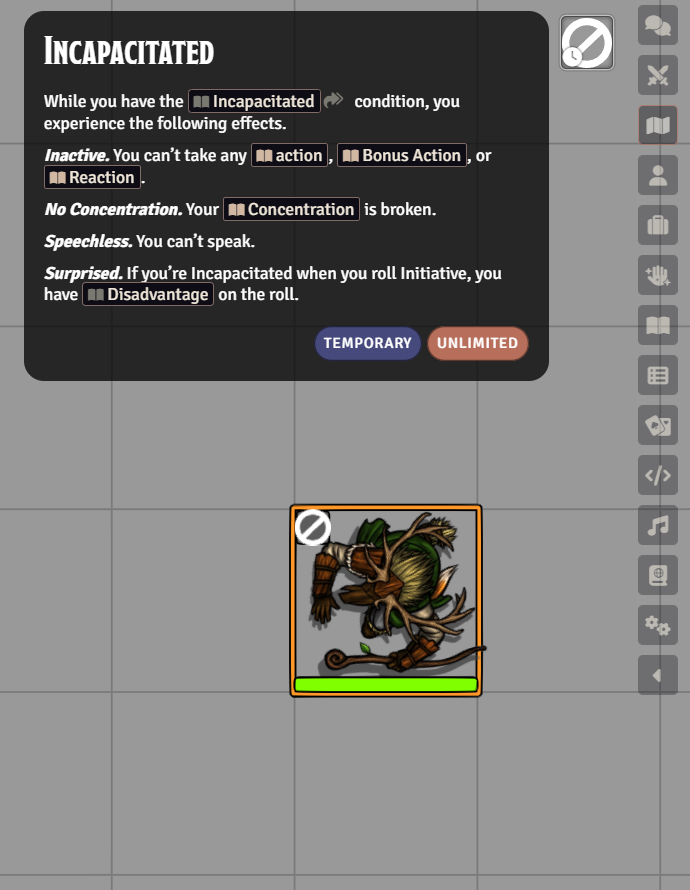
Features
- View all effects (active, disabled, and passive) on your selected token in a convenient panel
- Click an effect to see its name, description, and remaining duration, and click again to dismiss it
- Double-click any effect to quickly access its configuration
- Customize right-click behavior to enable, disable, or delete effects with a single click
- Configure visibility settings for different effect types and adjust panel behavior to match your preferences
- Pick individual effects to always show or always hide, so you can surface a couple of important passives without turning on every passive. These choices are per player, override the visibility settings, and are managed from the toggle at the top of the panel
Showing and Hiding Individual Effects
The toggle button (sliders icon) at the top of the panel enters manage mode, where every effect is shown with an eye badge. Click an effect's icon to flip whether it shows (open eye) or hides (crossed-out eye). Click the toggle again to exit; right-click it to clear all choices.
Choices are per player, keyed by effect name, and override the visibility settings - so you can leave Show Passive Effects off and still pin a passive to show, or hide one noisy effect without disabling its category.
Settings
| Setting | Scope | Default | Description |
|---|---|---|---|
| Show Disabled Effects | Client | Enabled | Show disabled effects in the panel with a grey tint. |
| Show Passive Effects | Client | Disabled | Show passive effects in the panel. |
| Show Duration Overlays | Client | Enabled | Show an overlay icon over each effect indicating its duration. |
| Allow Right-Clicking on Item Effects | Client | Disabled | Allow the right-click behavior to run on effects provided by items. |
| Icon Size | Client | 42 | The size of the icons in the panel, from 16 to 100. |
| Passive Effects Right-Click Behavior | Client | Disable | What right-clicking a passive effect does. |
| Temporary Effects Right-Click Behavior | Client | Dialog | What right-clicking a temporary effect does. |
| Passive Effects Shift Right-Click Behavior | Client | Disable | What shift right-clicking a passive effect does. |
| Temporary Effects Shift Right-Click Behavior | Client | Delete | What shift right-clicking a temporary effect does. |
| Allow Right-Click | World | Player | The minimum role required to run the right-click behavior on an effect. |
| View Permission | World | Player | The minimum role required to see the effects panel at all. |
| View Details Permission | World | Player | The minimum role required to see effect details such as duration and description. |
The four right-click behaviors each accept Dialog (prompt for what to do), Delete, or Disable. The three permissions each accept Player, Trusted Player, Assistant GM, Game Master, or None, where None disables that capability for everyone.
Per-effect show/hide choices (see Showing and Hiding Individual Effects) take precedence over Show Passive Effects and Show Disabled Effects.
Required Modules
- libWrapper by ruipin - A library that wraps core Foundry methods to make it easier for module developers to add functionality. Note that if you for some reason don't want to install this, a shim will be used instead.
Helpful Modules
While not strictly required, the functionalities provided by these modules drastically improve the usage of the features in this module.
- DFreds Convenient Effects by DFreds - Includes a ton of pre-configured effects for the DnD 5e system. It also adds a description box to the active effect config sheet which will be displayed on the effects panel.
- Times Up by tim posney - Deletes effects when their time is up or after a certain number of rounds or turns